
Help
How it works
Turn photos into a Facebook Marketplace or eBay listing in a few steps. You copy Facebook listings in yourself, and nothing is posted to eBay until you say so.
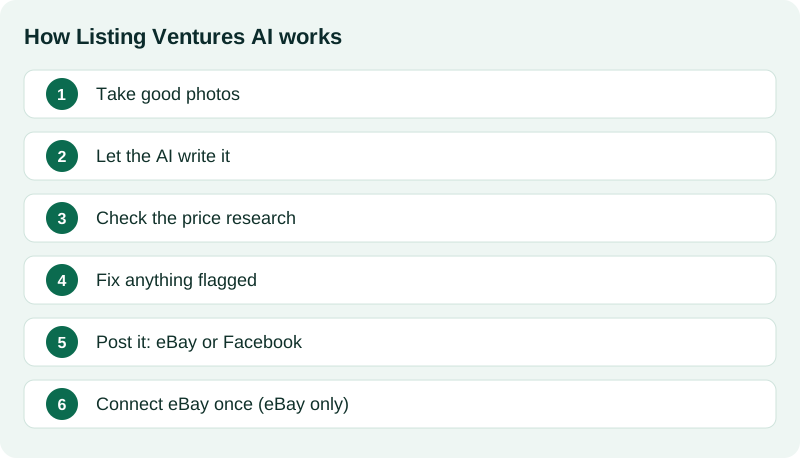
1. Take good photos
Tap Create draft and add clear photos: good light, a plain background, every angle, and close-ups of any labels or markings.
2. Let the AI write it
Tap Generate. We write the title, description and item details from your photos. It takes about a minute.
3. Check the price research
We look at what similar items really sold for. SOLD means a buyer paid that price. ACTIVE means it is only listed, not sold.
4. Fix anything flagged
A 'Needs attention' box lists anything eBay needs or that we had to guess. Tap a line to jump straight to it.
5. Post it: eBay or Facebook
eBay: tap publish and confirm. Facebook: open the Facebook page, copy each field into Marketplace, then tap Publish in Facebook yourself.
6. Connect eBay once (eBay only)
To publish on eBay, connect your eBay account one time. Facebook needs no connection. We never post anything without your OK.
Start here
New to selling on Facebook?
You do not need to know how Marketplace listings are written. Three steps get you a listing that is ready to paste.
- 1
Take photos
Use good light and a plain background. Add every angle and close-ups of any labels or flaws.
- 2
Tap Generate
We write the title, description and item details, and show what similar items sold for, so you can pick a price.
- 3
Copy it into Marketplace yourself
Each field has its own Copy button, and your photos are listed in order. Paste them into Facebook, then tap Publish inside Facebook.
We never log in to Facebook or post for you. You always tap Publish in Facebook yourself.
Experienced Marketplace seller
Get through a pile of items faster
- Bulk list up to 10 items at a time: add photos for each, generate, and review all the drafts on one screen.
- Every item gets a price check from real sold and active listings, with an asking price and a lowest offer you would accept.
- Save your usual shipping note, return policy and description footer once, and reuse them on every listing.
- Open any draft for its Facebook copy-and-post page: title, price, category, description and keywords, each with a Copy button.
- Optional Pirate Ship link for labels: sellers may get a bigger shipping discount than what Facebook offers.
Bulk posting to Facebook is not available. You paste each item into Facebook yourself.
eBay sellers
Publish straight to eBay
- Connect your eBay account once. You sign in on eBay's own page, and we never see your password.
- The app fills in the title, description, item details and price. A "Needs attention" box lists anything eBay would reject.
- Publish one item or a batch of up to 10 after you confirm. Nothing goes live without your OK.
- Optionally promote your listings and see your sales and estimated proceeds.
Whatnot sellers
Export CSV and prep a show
- Export drafts to a Whatnot CSV, then import it yourself in Seller Hub on desktop.
- Show sync: import live eBay listings, pause them on eBay for a show, upload sold orders, and relist leftovers.
- Show prep: number items, print pick labels, set start / min / BIN prices, and see a fee estimate.
- We do not auto-post to Whatnot and we do not host your show. You upload the CSV and run the stream yourself.
Put it on your phone
Open Listing Ventures like an app from your home screen.
Tips
Photo tips
- Use good light. A window works well. Avoid the flash.
- Use a plain background, like a table or a sheet.
- Take every angle: front, back, sides, top and bottom.
- Get close-ups of labels, tags, serial numbers, markings and any flaws.
What the estimate badges mean
- 'Estimated value' comes from real sold prices when we find enough of them.
- 'AI estimate' means we found no sold prices, so the AI made a careful guess. Please check it.
- Always set the price you are happy with. You are in charge of it.
SOLD vs ACTIVE
- SOLD: a buyer really paid this price. It is the best guide.
- ACTIVE: someone is asking this price, but it has not sold yet.
- Asking prices are often higher than what items actually sell for.
What is 'Needs attention'?
- A red 'Fix' line would make eBay reject the listing. Fix these first.
- An orange 'Check' line is a guess we made. Take a quick look.
- Tap any line to jump to that spot on the page.
Help articles
- Tired of eBay's new AI listing camera? List from your own photos
Start from photos you already took, check every field, then publish when you are ready.
- Avoid not-as-described returns with a clear Condition and flaws section
Show flaws, add measurements or tested status, and confirm risky words before you publish.
- Export drafts to Whatnot with a CSV
Turn drafts into a Whatnot CSV, then import on desktop Seller Hub.
- Pause eBay while you show on Whatnot
Import eBay, pause for the show, upload orders, relist leftovers.
- Number items, print pick labels, and set Whatnot prices
Callout numbers, pick labels, and comps-based starting bids for your Whatnot show.
Common questions
What are listing credits?
A listing credit is used when the AI writes a listing from your photos. You can see your balance on the Plans & billing page. Credits you buy never expire.
What are photo credits?
A photo credit is used each time we remove the background from one photo (Photo cleanup). Originals are always kept, and you can switch back any time.
Do I get free credits?
New accounts get 3 free listings and 3 photo credits right away, plus 6 more photo credits when they verify their email. Free credits have no cash value and expire after 45 days. If you don't see any, you can buy a credit pack.
How do I get a refund?
30-day money-back guarantee. Email support@listingventures.com within 30 days of buying a pack and we refund the unused credits. Credits you have already used are not refunded, unless the service failed to give you a usable result. Use the email you signed up with.
I have never sold on Facebook Marketplace. How does this work?
Take photos and tap Generate. Then open the draft's Facebook page. It shows your title, price, category, description and keywords, each with a Copy button, and your photos in order. Paste them into Facebook's Create listing form and tap Publish in Facebook.
Does the app post to Facebook Marketplace for me?
No. We never log in to Facebook or post there. We prepare the text and photo order, and you paste it in and tap Publish inside Facebook yourself. Bulk posting to Facebook is not available.
How do I connect eBay?
Open Marketplace options (or the eBay card on My listings) and tap Connect eBay. You sign in on eBay's own page and approve access. We never see your eBay password and we never post anything without your OK.
eBay says I need to reconnect.
eBay access runs out from time to time. Open Marketplace options and tap Reconnect. Nothing is posted or changed on eBay when you reconnect.
Does the app post to eBay by itself?
No. Nothing goes to eBay until you tap publish and confirm. We never end or change a live listing on our own.
What is the 'Needs attention' box?
It lists things to fix before you publish. A red 'Fix' line would make eBay reject the listing. An orange 'Check' line is a guess we made. Tap a line to jump to it.
What do SOLD and ACTIVE mean?
SOLD means a buyer paid that price. ACTIVE means it is listed but has not sold. Sold prices are the better guide.
How do I delete a draft?
On My listings, tap the red Delete button on the draft, or use Edit many to pick several. You can also use More > Delete draft inside a draft. Photos and cutouts are deleted too. Anything already live on eBay has to be ended on eBay first.
Can I buy shipping labels for my orders?
Yes, if you like. Pirate Ship is a separate shipping service (Listing Ventures is not connected to it). It says it has no monthly fees or markups; you pay only for postage. For eBay orders, connect your eBay account inside Pirate Ship (Settings, Integrations, Connect New Source, eBay) and tap Import from eBay to see paid orders that haven't shipped. Buying a label there marks the order shipped on eBay. Facebook Marketplace isn't one of Pirate Ship's connections, so for those orders copy the buyer's address into Pirate Ship's Create a Single Label, then add the tracking number on Facebook yourself. Use the Ship with Pirate Ship link on a sold item, or the Shipping page. You can hide it in Your account.
Can I sell toy guns or other restricted items?
eBay allows toy, cap and replica guns only with a bright orange plug on the barrel, a photo of the real item, and a required sentence in the description. We add the sentence when we spot a toy gun, but you must make sure the plug is really there. Real firearms, ammunition and many weapons are not allowed. Check eBay's rules for anything unusual.
How do I reach a person?
Email support@listingventures.com and include the email you signed up with. We usually reply within one to two business days.
More answers
Can I list on Whatnot with this?
Yes. Export drafts to a Whatnot CSV and import it in Seller Hub yourself. For shows, import eBay listings, pause them on eBay, number items, print pick labels, set prices, upload sold orders, and relist leftovers. We do not auto-post to Whatnot or host your stream. Help: /help/export-to-whatnot, /help/whatnot-show-sync, and /help/whatnot-show-prep.
What do I get from one listing?
You add photos of an item and tap Generate. You get a title, description, price guidance based on comparable sold and active listings, and a listing ready to copy into Facebook Marketplace, publish to eBay once you connect your account, or export as a Whatnot CSV. One listing credit covers one listing.
Do I need professional product photos?
No. Start with one clear phone photo. Labels, maker marks, damage, measurements, and typed notes are helpful when you have them, but the item guess, condition, and notes fields are optional.
Can I scan an ISBN or barcode with my camera?
Not in the current public flow. ISBN and barcode are typed entries where those fields are available; camera scanning is not currently offered.
How do credit packs work?
Packs are a one-time purchase, not a subscription. Listings-only packs start at $2.99 (no PhotoRoom cleanup). Bundled packs with PhotoRoom cleanup are Quick Pack $4.99, Seller Pack $14.99, and Bulk Pack $44.99. Paid credits never expire. Checkout is handled securely by Stripe.
Still stuck? Email support@listingventures.com, or open the Help button inside the app to ask a question. See also our Support page, Terms and Privacy Policy.